

To reduce ping in CS2, connect your PC with a cable instead of Wi-Fi, stick to the nearest Valve data center and pause downloads. If that is not enough, ask your ISP to fix the route. Console commands do not lower ping. They show it and limit matchmaking to nearby servers.
Ping is the time a packet takes to reach the server and come back, in milliseconds. A CS2 server updates the game 64 times a second, once every 15.6 ms. An extra 30 ms of ping costs you two of those updates.
How to check your ping in CS2
The quickest way is the scoreboard. Hold Tab: each player’s ping is in the column under the signal icon.
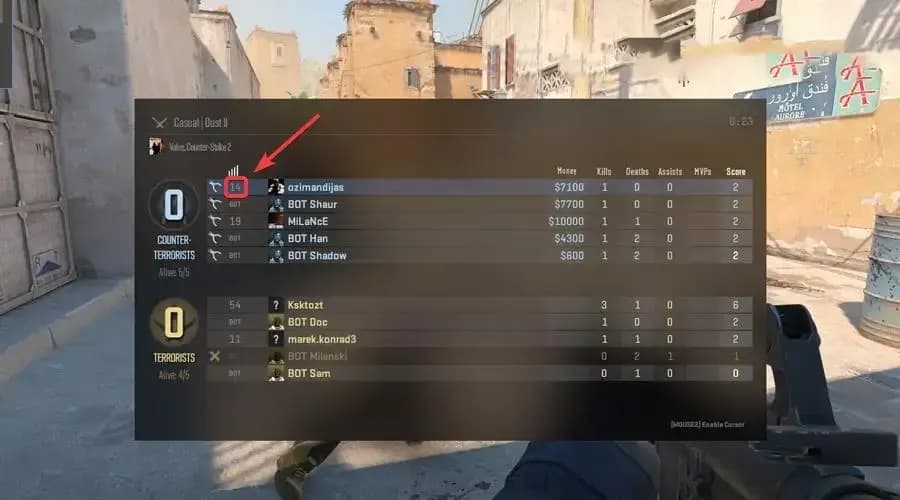
To keep ping on screen all the time, open Settings → Game → Telemetry and set “Show ping” to “Always”. Turn on “Show network problems” there as well. It shows the share of ticks lost to packet loss and jitter. That tells you whether a hitch comes from the network or from your PC.
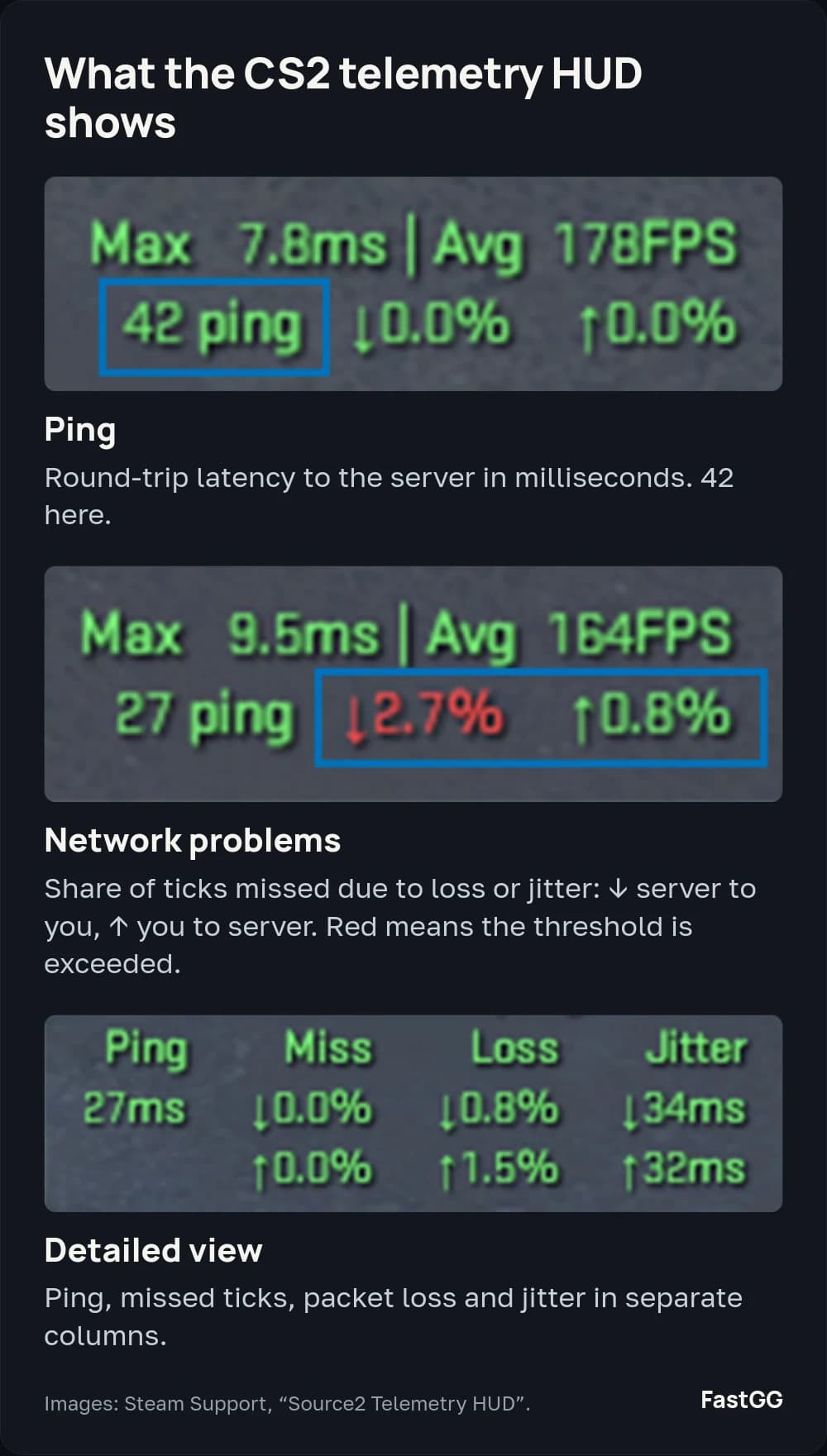
The console equivalent is cl_hud_telemetry_ping_show 2. The old net_graph does not exist in CS2, and Valve deleted its early replacement cq_netgraph in the February 15, 2024 update. Every telemetry readout is explained in Steam’s telemetry guide.
CS2 console commands for ping
No console command lowers your ping: commands cannot change the distance to the server or your ISP’s route. The console is still useful for watching latency and limiting matchmaking. Turn it on under Settings → Game → Enable Developer Console and open it with the ~ key.
Work in CS2:
cl_hud_telemetry_ping_show 2: always shows ping on screen. 1 shows it only in poor conditions, 0 never.cl_hud_telemetry_net_misdelivery_show 2: the share of missed ticks: ↓ server to you, ↑ you to server.cl_hud_telemetry_net_detailed 2: detailed view: ping, packet loss and jitter.cl_hud_telemetry_ping_poor 80: ping above this value turns red. The default is 100 ms.net_print_sdr_ping_times: prints your ping to Valve’s network sites and the chosen route.mm_dedicated_search_maxping 60: max ping for matchmaking: 25 to 350, 150 by default.cl_net_buffer_ticks 1: buffers 1–2 ticks to hide packet loss. Adds latency.rate 786432: the menu maximum, “Unrestricted”: about 6.3 Mbps. Does not lower ping.
Do not work in CS2:
net_graph 1: the network graph from CS:GO.cq_netgraph 1: the net_graph replacement in early CS2, removed in 2024.cl_updaterate 128,cl_cmdrate 128: CS:GO update rates.cl_interp 0,cl_interp_ratio 1: interpolation. Valve locked manual tuning and moved it to the buffering setting, so leave these alone.
Why rate 128000 gets in the way
The tip to set rate 128000 is left over from CS:GO. The rate command sets how many bytes per second the server may send you. 128,000 bytes per second is about 1 Mbps, a sixth of “Unrestricted”. In the Max Acceptable Game Traffic Bandwidth setting (Settings → Game), that falls between “Extremely restricted” and “Below 1.0 Mbps”.
If your setting is higher, the command cuts your bandwidth. Valve’s tooltip for that setting warns that too little bandwidth delays packets when the server sends you updates about several players at once. Check what the menu shows and pick “Unrestricted” or set rate 786432. Lower it only if your ISP or router drops packets.
What is a good ping in CS2?
Valve does not publish a target, but it does set a threshold: by default the telemetry HUD turns ping red above 100 ms.
Below 100 ms, distance to the data center matters most. Light travels through fiber about a third slower than in a vacuum, so every 100 km adds roughly 1 ms of ping. Cables rarely run in a straight line. Even between Valve’s own sites, ping is about twice the theoretical minimum: Frankfurt to Stockholm is 1,190 km and 21 ms.
A handy benchmark is a friend from your city in the same lobby. Matchmaking puts everyone on one server, so their ping is right there on the scoreboard. If they have 20 ms and you have 60 on a wired connection, your ISP’s route is the likely cause. Random players are no benchmark: they may live in another country.
What affects your ping
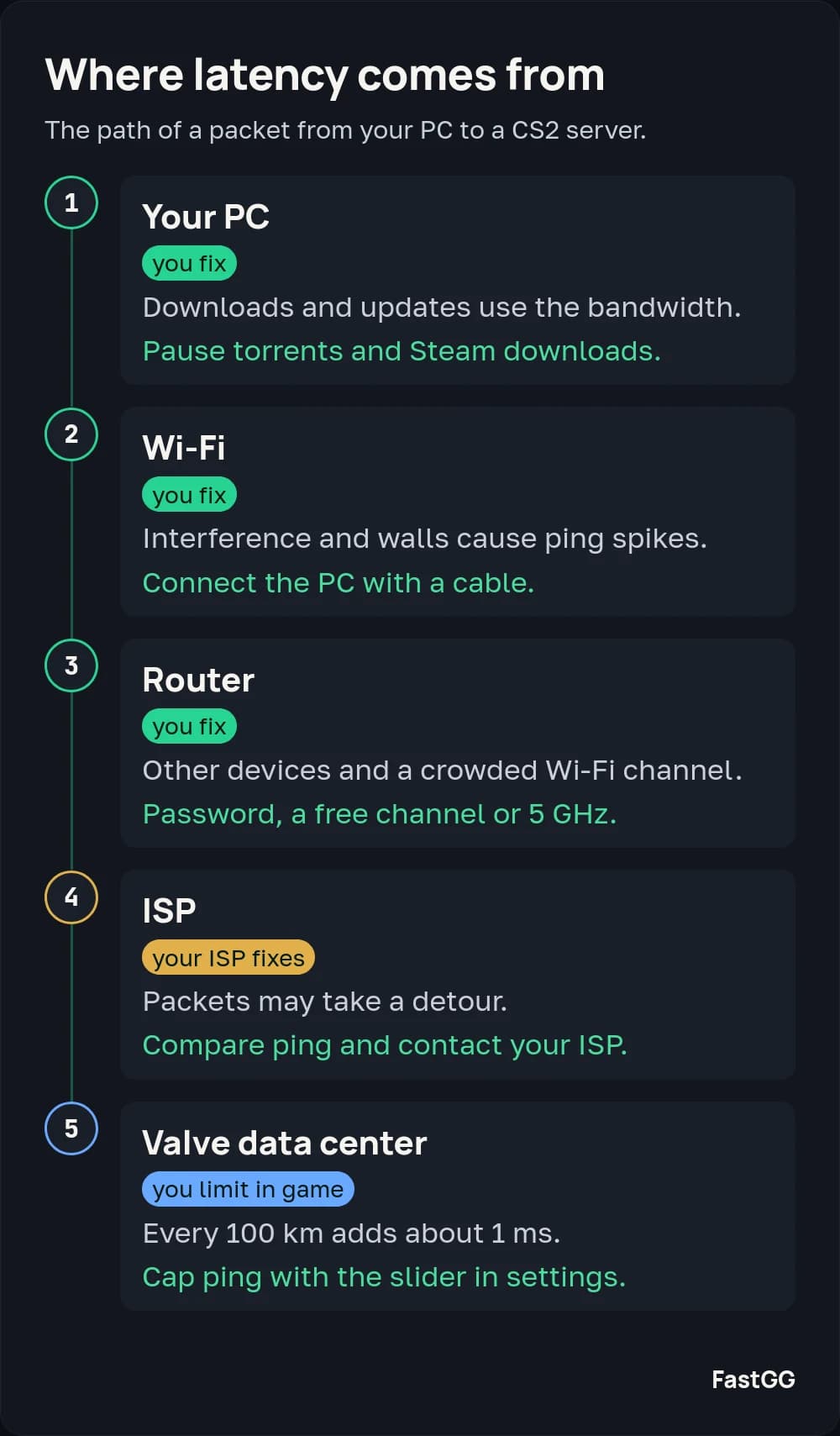
Latency builds up along five parts of the path: your PC, Wi-Fi, the router, your ISP and the distance to the Valve data center. The first three are in your home, and you can fix those yourself.
Wi-Fi or cable?
Wi-Fi most often causes ping spikes: walls and neighboring networks interfere with the signal, and some packets arrive late. To test it, connect the same PC to your router with a cable and play on the same server. If the spikes go away, keep the cable or move the router closer. If nothing changes, the cause is further down the path. A cable does not shorten the distance to the server or change your ISP’s route.
Router and background downloads
- Downloads. Torrents and Steam or Windows updates use bandwidth even in the background. Pause them while you play.
- Wi-Fi password. Without one, other people’s devices use your bandwidth. Set a password in the router settings.
- Wi-Fi channel. If nearby networks share your channel, pick a free one in the router settings or connect over 5 GHz.
- Firmware. Use the update option in the router’s own settings. If your ISP supplied the router, ask them.
Choose a suitable server
Settings → Game has a Max Acceptable Matchmaking Ping slider. Below it, the game lists the nearest official data centers and your ping to each. Valve added this list in the October 13, 2023 update.
Set the slider a little above your ping to the one or two nearest data centers. With 18 ms to Stockholm and 30 ms to Warsaw, 35 is enough. Matchmaking will then look for games only there, though the search may take longer. If no server fits, the game still sends you to the nearest available one, and your ping can exceed the limit.
The net_print_sdr_ping_times command also prints your ping to Valve’s network sites. Use it to compare different days and times.
How to investigate an ISP problem
Your ISP decides which path your packets take to the data center. Two neighbors on different ISPs can have noticeably different ping to the same server.
Write down your ping to the nearest data centers from the settings list in the morning and in the evening. Ask a friend in the same city on a different ISP to open the same list. If their ping to the same data centers is clearly lower, or yours spikes in the evening, send those numbers to your ISP. Ask them to check the route to Valve’s servers. If they do not fix it, only a different ISP will lower your ping.
Low ping but the game still stutters?
Stutter at normal ping comes from packet loss and jitter, when packets arrive unevenly. Turn on network problems and frame time in the telemetry settings. First set the thresholds there: Frame time warning threshold slightly above your usual maximum, Network tick miss rate warning threshold to 0.5%. By default frame time only turns red above 100 ms, so a normal hitch will not show. If the missed-tick percentage turns red during a hitch, the network is to blame. If the frame time turns red, your PC is.
For network hitches, use Settings → Game → “Buffering to smooth over packet loss / jitter”, or cl_net_buffer_ticks in the console. A buffer of 1 or 2 ticks hides some hitches, but each tick adds 15.6 ms of latency. Start with 1 tick and compare.