
0 0

Корзина

No products in the cart.

Continue shopping

Fast boost with FastGG guarantee

Boost per wins Valorant

Valorant Rank Boost - Pay for Wins | Radiant Rank Boosters | Quality Guarantee

Valorant per wins Calculator

Use the calculator to place your order
  • Current rating
  • Iron - I
  • Iron II
  • Iron III
  • Bronze - I
  • Bronze - II
  • Bronze III
  • Silver - I
  • Silver II
  • Silver III
  • Gold - I
  • Gold II
  • Gold - III
  • Platinum - I
  • Platinum II
  • Platinum III
  • Diamond I
  • Diamond II
  • Diamond III
  • Blossom - I
  • Blossom II
  • Blossom III
  • Immortal - I
  • Immortal II
  • Immortal III
  • Current rating
  • 1 Victory
  • 2 Victory
  • 3 Victory
  • 4 Victory
  • 5 Victories
...
Current rating
strelka busta | FastGG - Boost game accounts CS2, Valorant, Dota 2
Num of victories
...
Priority order status, play when it's convenient for you
Boost will be conducted in stealth mode
Payable to: Select your current rating and desired number of wins

How does it work?

Pre-boost steps

1. Select a service

Use the calculator to select your rank and how many victories you need to make

2. place an order

When placing an order, please specify your email address to which you will receive a payment check to start the work

3. Fill in the data

Fill in your details at checkout or arrange a convenient time for the boost (if boosting in the lobby)

4. Start boosting your account

That's it, these simple points will get you started on your order in just 5 minutes 🙂

Reviews from our Clients

We do everything possible to provide our clients with the best service.
Feedback avatar

Estanee Estanee

Rating
Borrowed the recruitment of likes, everything is great! All the likes came, recommend!

Source of Review

trust index logo
Avatar for the review

Anton Navarov

Rating
I've been buying watches for two years now, the discord is certainly more convenient, thank you.

Source of Review

VK logo
Feedback avatar

Maxim Lee

Rating
Well on accs do not throw 😆 Boost of course not from silver to global in a day, but relatively fast, thank you, the price would be lower by 30 percent and will be cool)

Source of Review

VK logo
avatar 1 | FastGG - Boost game accounts CS2, Valorant, Dota 2

Sebastian

Rating
Cool service and fast boost

Source of Review

trust index logo
Avatar for the review

Ivan Vasilievich

Rating
Comments waited 30 hours, although it says that up to 72h, overall satisfied, but a little faster and would be cool

Source of Review

VK logo
Avatar for the review

Matvey Ivanushkin

Rating
I used this service for the 1st time, I thought it was a scam But it wasn't, the work was done qualitatively, and most importantly took only 15 minutes and ouala and beauty, which is not to admire).

Source of Review

VK logo
Avatar for the review

Sasha

Rating
Boost commends worked well, I want a review bonus =)

Source of Review

trust index logo
Avatar for the review

Ivan A.

Rating
Thank you very much to the service ! In 7 days from 4 stars to lem ! Top service

Source of Review

VK logo

The best solutions in industry

FastGG sets new standards in gaming services.
Cooperate with pro players CS2, Valorant, dota2 and others
Boost from PRO 
Leave the boost to the professionals - we only employ the best players
kartochka bezopasnost min 800 600 | FastGG - Boost game accounts CS2, Valorant, Dota 2
Anonymity
Your anonymity is our main concern! The entire boost is conducted in "offline" mode
kartochka skorost min 800 600 | FastGG - Boost game accounts CS2, Valorant, Dota 2
Quick Start
We are ready to start working with your order as soon as 10 minutes after placing your order
sposoby oplaty min 1 1024 1024 1024 | FastGG - Boost game accounts CS2, Valorant, Dota 2
Secure payment
We value your privacy: pay securely and anonymously

We Answer Your Questions

Do you have any questions? Write to us in the online chat or contact us via Discord
Our support team will be happy to assist you 🙂

Rank boost in Valorant is possible directly from the account and in the lobby.
In a direct boost, the performer will log into your account and with a series of wins, raise the desired rank. 
Lobby Boost, or in another way pumping in a group, is a type of boost, when you play from your own account, without giving it to anyone else

After placing an order on the site, you will have access to a personal account, where you can set all the parameters of the boost, to coordinate a convenient time for you and simply communicate with the performer 

To boost your Valorant account, there will be no need to disable 2fa protection, ensuring that your account is completely secure
This means that access to your account and settings remains solely in your hands.  

We work only with PRO players, who have signed contracts with us and provided passport data as well

When it comes to calibration services in Valoranta, we are confident that our services are the best in the market. Here's why:

  1. Professional players: Our performers are proven players with Radiant rank and high statistics, which guarantees a high final rank.
  2. Quick start: Our performers are ready to start calibration within 10-15 minutes after placing an order.
  3. High quality: We offer a variety of options for calibrating your Valorant account to meet your every need.
  4. Safety and trust: We ensure complete security of your account and keep in touch via a private cabinet where you can customize calibration settings and communicate with the performer.
  5. Customer Testimonials: More than 2000 positive reviews confirm the quality of our services. We are proud of the trust of our customers and do our best to justify it.

When you choose us, you choose quality, reliability and professionalism.

Boost speed is highly dependent on your current rating and statistics, we take this indicator very seriously. Our performers are high class players who are able to boost your rating in minimum time.
For example, a standard Valorant boost takes about 48 hours to complete

We are always happy to help and answer any questions you may have! You can contact us in several convenient ways:

  • Online chat:Write to us in the online chat on our website, and we will respond to your request promptly.
  • Discord:Join our Discord channel, where you can receive consultation and support from our team.
  • Phone:Call us during business hours, and we will answer all your questions.

For additional information and contact details, visit our "Contact Us" section. ContactsWe aim to provide quality support and consultation for all our clients.

Live Support

Do you need help?

Our managers are always happy to help you, just write to us 🙂 🙂
Do you need help?
We're here to help - email us!
"Counter-Strike 2" and "Dota 2" are registered trademarks owned by Valve Corporation. "Valorant" is a registered trademark owned by Riot Games. Our company (or "We", based on the context) has no official relationship with, and is not affiliated, associated or endorsed by, Valve Corporation or Riot Games. All rights to trademarks belong to their rightful owners.

© FastGG

Steam Comments Rollup Instructions

Welcome! Please follow the simple steps to place an order for comment baiting in Steam.

Step 1: Go to the FastGG Control Panel

Going into control panel(clickable text) and register or login (if you have previously created an account).
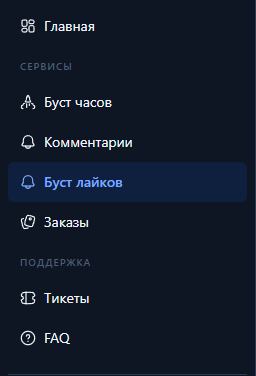
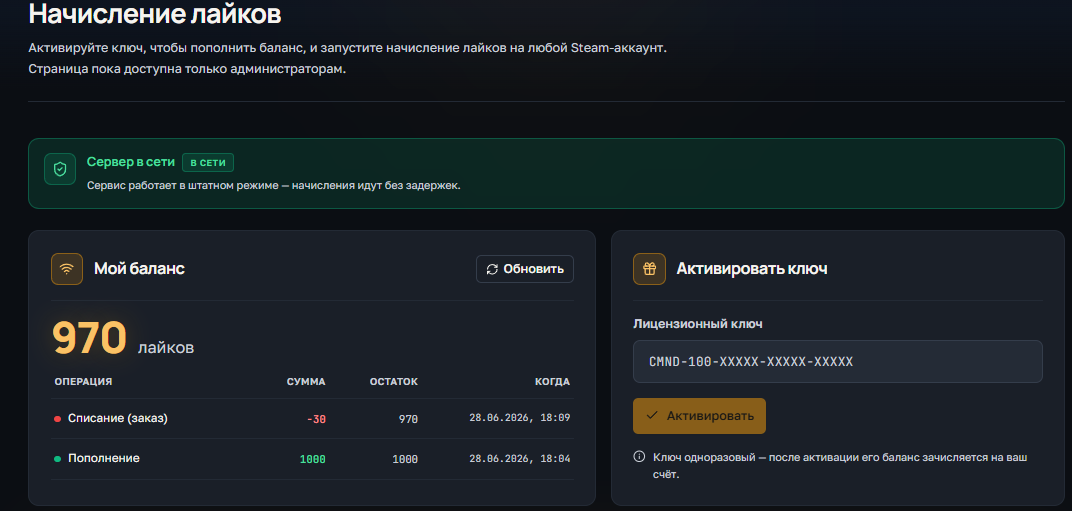
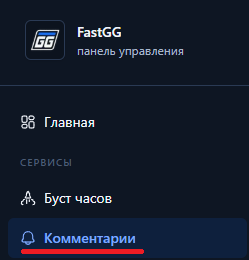
Step 2: Go to the comment scoring section

Comments section in the control panel

Step 3: Activate the order key
  1. After payment in front of you will be a receipt with the product and instructions (also it is duplicated to the mail specified at payment), leaf down to the bottom to the section "Your(s) license(s) key(s):" and copy the necessary key.
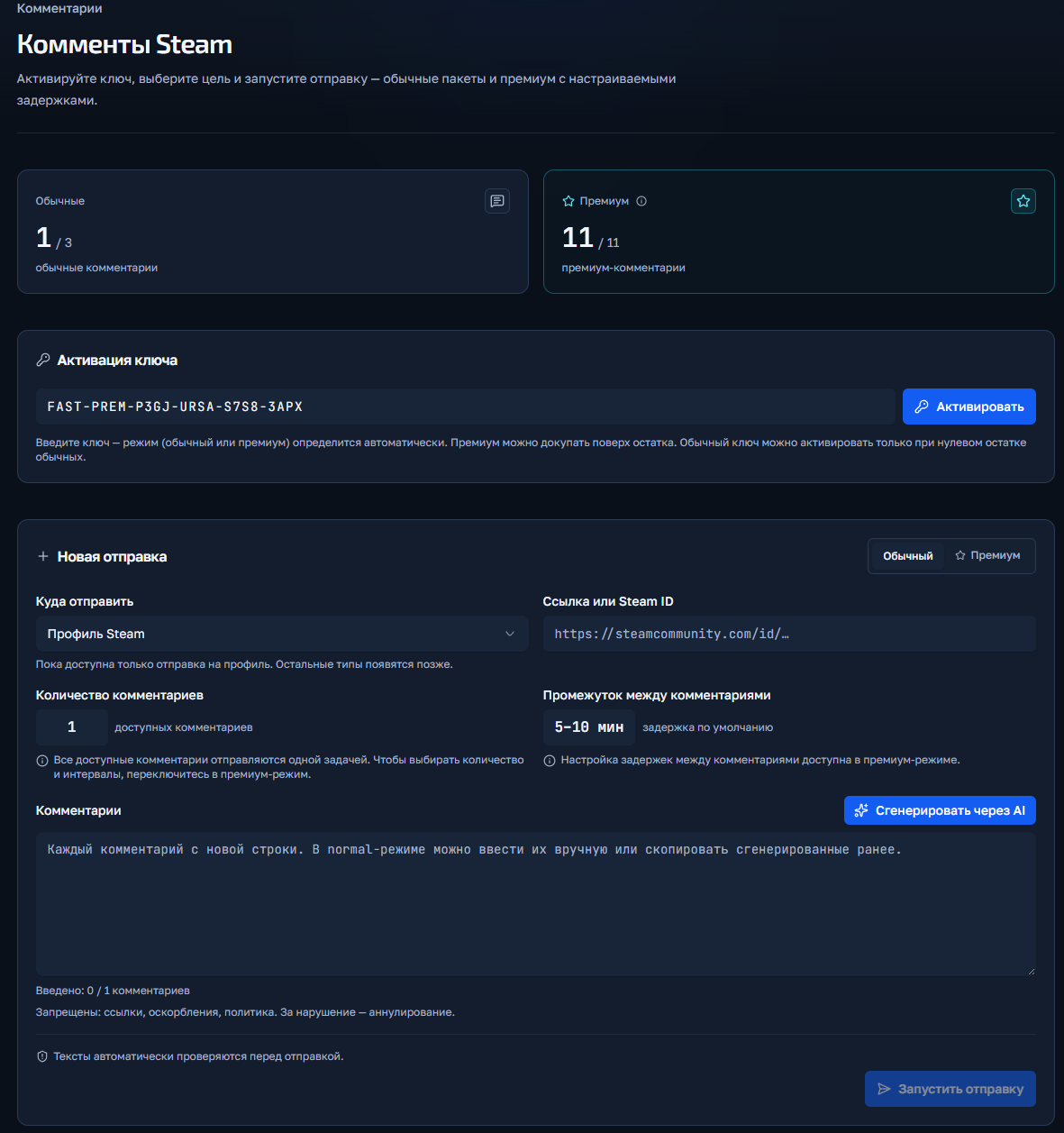
  2. Activate the key in the "Key Activation" field"

Activating the key in the control panel

Step 4: Launch the order
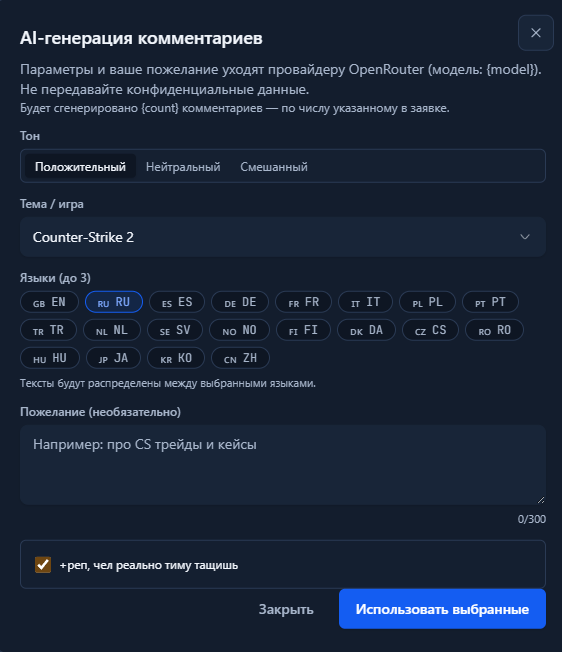
  1. If you have purchased "Normal Comments", then under the "normal" tab you fill in the profile link and specify the comments (or use the generate button) and run them. In regular comments there is no choice of number or time of posting.
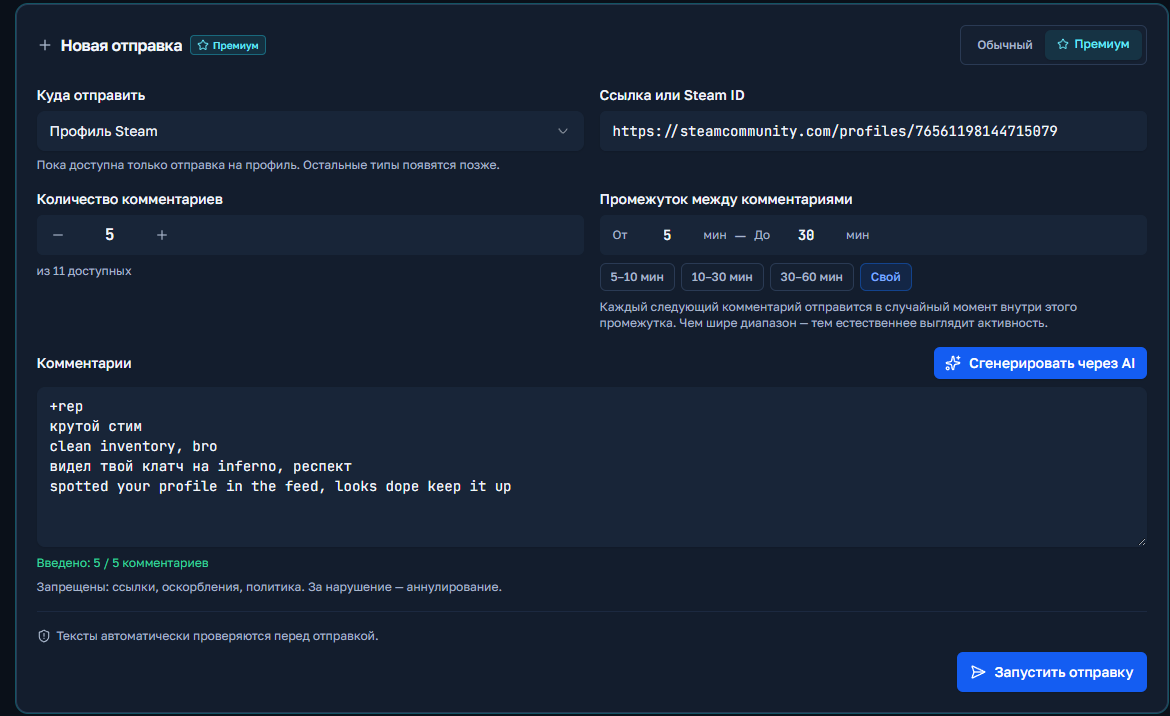
  2. If you have "Premium Comments", then similarly in the "Premium" clade you specify the link, can select the quantity, specify the delay minimum and maximum and also insert or generate comments.

Generating AI comments

Step 5: Order fulfillment

You click the "Start Shipment" button and if there are no errors, the order will start and appear below in the "Shipment History" field.

Launching premium comments

CS2 / Valorant Boost Instructions

Welcome! Please follow the simple steps to place an order for a Boost in CS2 or Valorant.

Step 1: Upgrade to a Discord server

Go to our official Discord server

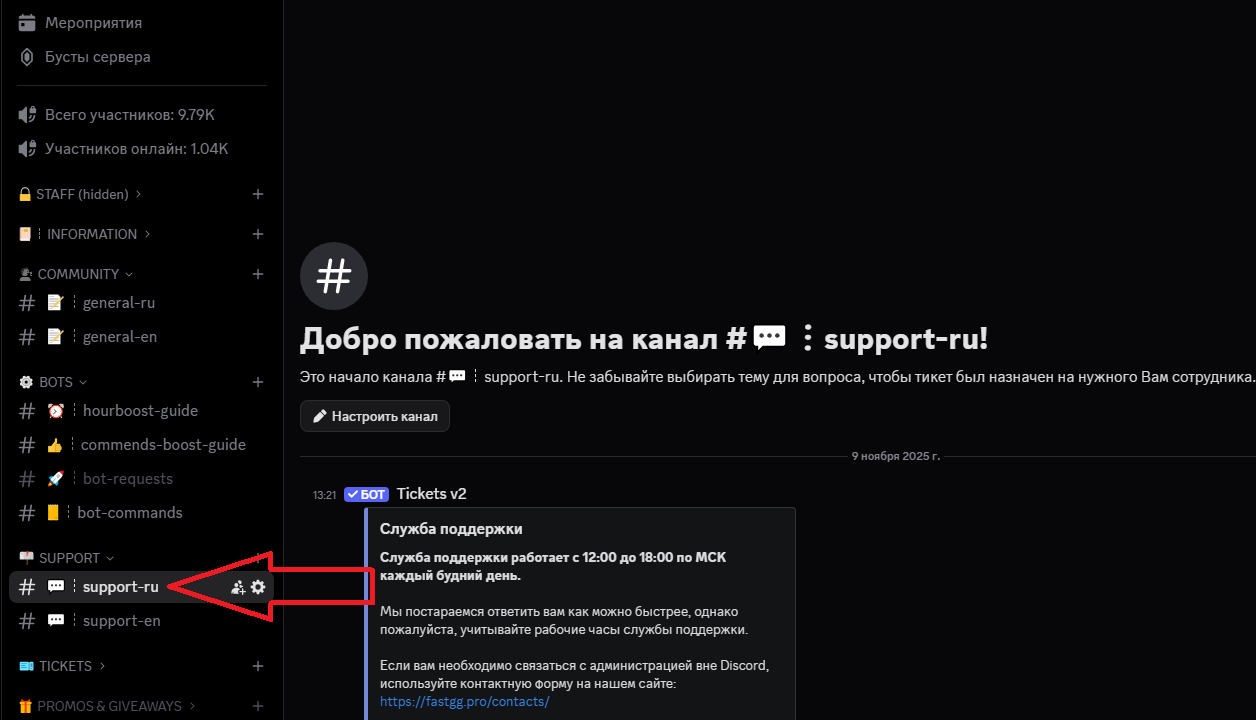
Step 2: Create a request in the support channel

Find a channel on the server called "#Support-ru or support-en".

Step 3: Filling in the data and waiting for processing

In this channel, open a request (ticket) to add an order by selecting the "Boost Rank/Valorant" section.
In the created application form, fill in all necessary data that is requested for ordering (e.g. order no., etc...).
We will quickly process your request and add your order! 😉

Watch Boost Instructions

Welcome! Please follow the simple steps to activate your key and start Steam cashback

Step 1: Receive a check

After successful payment, you will receive an electronic check to the email address you provided.
The check will contain:

  • A unique activation key for your order.
  • A copy of these instructions for your convenience.
  • Direct link to our official Discord server in case you need support
Step 2: Activating the key

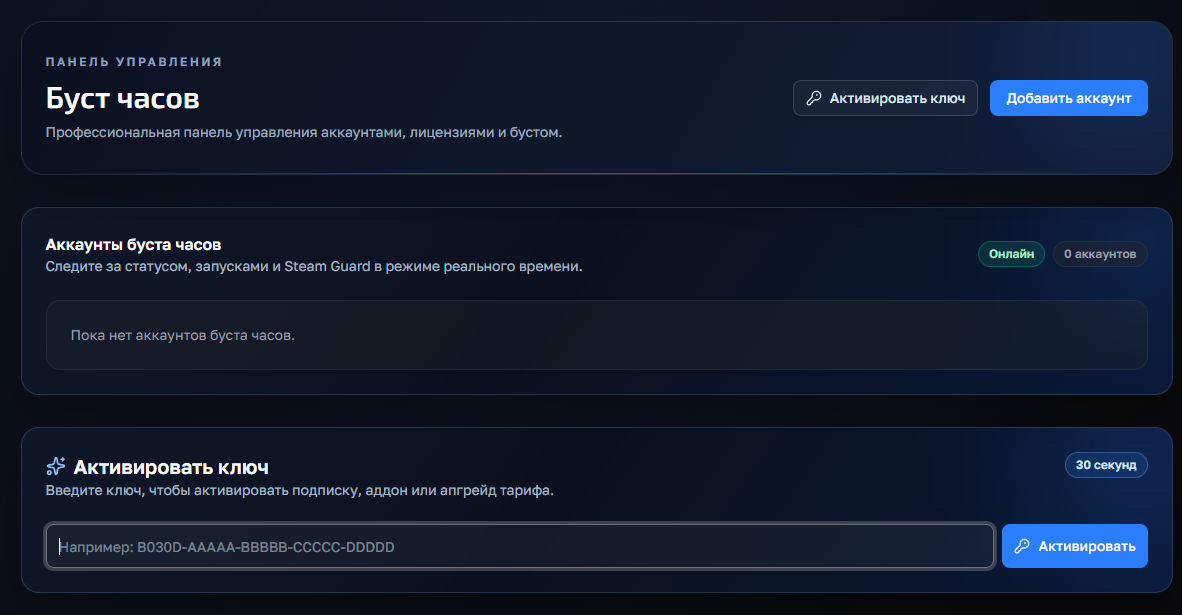
Go to the panel to control the clock boost and activate the key.
1) Going to the website - https://panel.fastgg.pro/ and register (click "sign in via Google or "Register").
2) Select the "Boost Hours" section (or from the link - https://panel.fastgg.pro/dashboard/hourboost) and in the "Activate key" field insert the key contained in the order receipt.


3) Click the "Add Account" button and enter your Stim Login and Password.
4) Now click on the "customize" button, inside you can enter the status (if the tariff allows) and be sure to add games to run (you can enter the names or id of the games).
5) All, click "save" and you can turn on the nakrutka button "Start", further intuitivino site will prompt when you need to enter the code to enter (from mail or on your phone), or will give an error, if there is one.

Step 3: Problems and questions

If you have any problems or questions, we recommend that you pay attention:
1. FAQ section with answers to questions - https://panel.fastgg.pro/dashboard/faq
2. Support/Ticketing system for dialog with support - https://panel.fastgg.pro/dashboard/tickets

Instructions for Liking 

Welcome! Please follow the simple steps to place an order for likes in CS2.

Step 1: Go to the FastGG Control Panel

Going into control panel(clickable text) and register or login (if you have previously created an account).

Step 2: Go to the likes section

likes section

Step 3: Activate the order key
  1. After payment in front of you will be a receipt with the product and instructions (also it is duplicated to the mail specified at payment), leaf down to the bottom to the section "Your(s) license(s) key(s):" and copy the necessary key.
  2. Activate the key in the "Key Activation" field"

Step 4: Connect to the server and start the likes

Below you have the section "Server commands"From there you can copy the address of connection to the server (paste into the console) and commands to start likes (paste or write manually in the game chat).
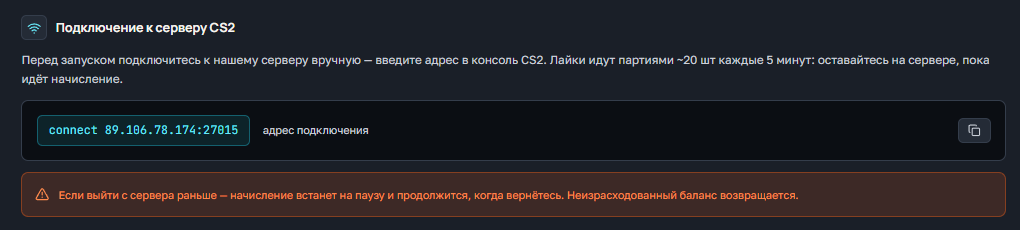
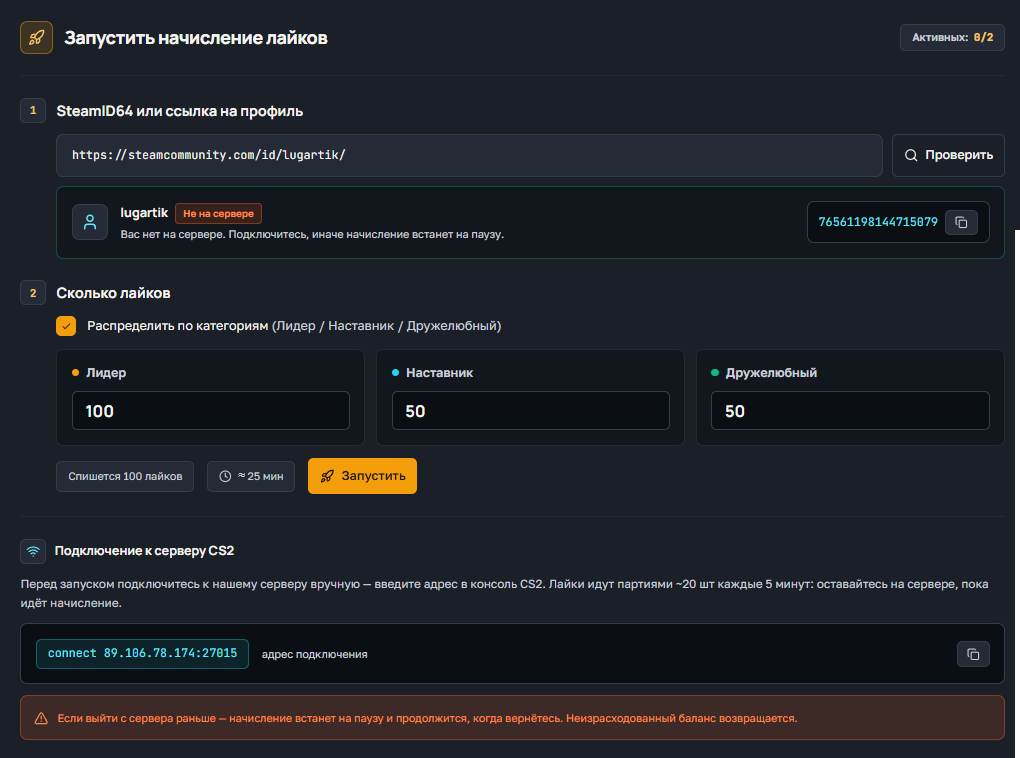
commands to connect and run likes


There's only one reason CANNOT to be on the server in the game when the likes are credited

Copy the command from the instructions or write it manually, the command is inserted into the game chat, not the console!

If you are failing, then at some point, you are doing it wrong.
Over 2 million likes have already been spent on the likes server and that's about 45000+ users, each of them connected using the same instructions.

In the FASTGG control panel, open the tickets section and write your appeal, attaching all the necessary information